InkMagnet — a book that gets proofread before you download it.
My own product: a topic goes in and a complete book comes out —
structure, chapters written from sources the system has actually read,
illustrations, a cover, print-ready typesetting and an EPUB. Below:
why “AI will write a book” is harder than it seems, and which parts
were the most interesting to build.
Writing text and publishing a book are two different jobs.
The first ends with paragraphs in a browser window. The second
requires the whole thing to hold together for a hundred pages,
footnotes that lead where they promise, and a typeset file that
looks like a book rather than a printed document.
01
At a hundred pages, the model loses the thread
In longer forms threads start to repeat, chapter seven has no idea what chapter three established, and the ending summarizes what was said a moment ago. A hundred pages is a different task than ten.
02
An editor export is not typesetting
A file saved to PDF looks like a document, not a book: orphans at line ends, widows at page tops, hyphenation borrowed from the wrong language, a table of contents without working links.
03
Page numbers in footnotes get invented
The publication is often real while the page cited next to it is not. In a book with a hundred footnotes, nobody checks each one by hand.
04
The worst flaws only show up after typesetting
A typesetting command printed as literal text, an image running past the margin, a table split across two pages. In the source it all looks fine, and no text checker will catch it.
The approach
Decisions that set up everything else.
Each of them costs more work and more model calls than the obvious
solution. Without them, though, you get a file that looks like
a book only from a distance.
Structure before the first sentence
The full plan comes first: chapters, subchapters and a source brief for each of them. Only then does any writing start, so every chapter knows what the others are supposed to say.
Chapters written from material actually read
For every chapter the system gathers sources, fetches their content and writes from what they say. Names, numbers and dates come from the material rather than the model's memory.
Real print typesetting
The book is typeset in LuaLaTeX — the same tool academic publishers use. That is where correct hyphenation, a clickable table of contents and a print-ready PDF come from.
Inspection on the typeset page
After compilation every page is inspected the way a reader will see it. Flaws invisible in the source surface exactly here — and go back for fixes before the file reaches the download.
From the product
Straight from the product.
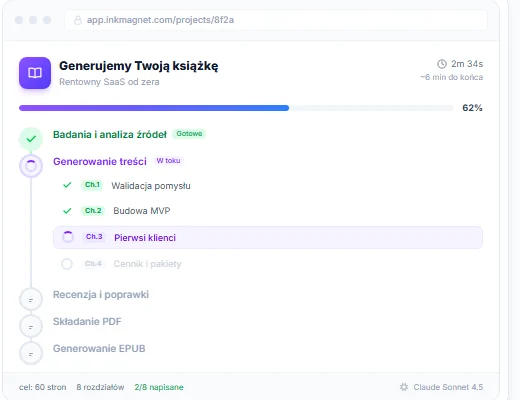
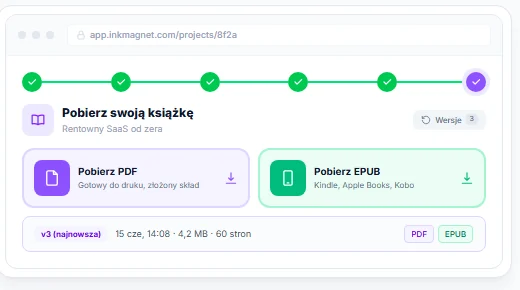
Two views: the pipeline watched live, and what you are left with at the end.
The process, visible chapter by chapterSource research, chapters written one after another, review and fixes, PDF typesetting, EPUB generation. Alongside it: progress, estimated time and a counter of finished chapters.
Two files and a version history at the endA fully typeset, print-ready PDF, plus an EPUB for e-readers and stores. Every rebuild is saved as a separate version, so a fix never erases the previous release.
The hard part
What you can't see in the finished file.
This is the most interesting part of the project and the only place
where it gets decided whether you end up with a book or with a file
for the trash.
Proofreading what is on the page, not in the sourceThe biggest class of flaws in a typeset book is invisible to text checks: a typesetting command printed as plain text, a paragraph running past the margin, an image cropped or blown up to fill a page, a broken table, a blank page in the middle of a chapter. The solution turned out to be easier to describe than to build: after compilation, every page is rendered to an image and inspected by a vision model exactly the way a proofreader would go through a printout. The model quotes the fragment that looks wrong, a second model finds that spot in the chapter source and applies the fix, and the book is typeset again. The loop has a hard limit on passes, so it cannot spin forever on a flaw that cannot be fixed.
A footnote page number that has to existAsk a model for a footnote and it will happily add a page number it has never seen. The check here is deliberately mechanical, with no second model involved — at a hundred footnotes per book, the cost of judging each one would be unacceptable. Every “p. X” has to point to a page actually present in the source material and additionally overlap lexically with the sentence the footnote is attached to. If either condition fails, the page number is removed and the footnote stays — a footnote without a page beats a footnote that leads to the wrong place.
Catching statistics pulled out of thin airA separate mechanism scans the text for numbers posing as research results: correlation coefficients, significance levels, test values and percentages given to decimal precision — whenever they stand without a footnote. Those spots go into a report rather than being silently deleted, because some of them are fine and the call belongs to a human.
Typesetting that does not crack on generated contentLaTeX is unforgiving: one special character in a chapter title, an unclosed environment or a quotation mark in the wrong place and compilation stops. The content is generated automatically, so there is no way to eyeball it beforehand — I had to build a layer that cleans and repairs the typical errors before the book goes to typesetting at all.
What's in it for you
A document that goes straight to the client.
The same pattern works anywhere data has to become a document with
a fixed structure that someone will later print or send out:
a report, a study, documentation, an offer, a catalog. What sets it
apart from plain text generation is that the result is checked on
the typeset page — and only after that check does it reach the download.
If someone at your company assembles documents like this by hand
today, describe what they look like and what changes between one and
the next. I'll reply with how much of it can be taken off a human's plate.
Related services
What I do beyond my own products.
InkMagnet is an AI implementation wired to automated document typesetting. Below, the rest of what I do for companies, with starting prices.
Assembling documents by hand, even though they come from the same data every time?
Describe what such a document looks like and what changes with each new one. I'll reply with how much of it can be automated, where a human decision still belongs, and where to start.