Moving a company website from WordPress to AWS: same look, hosting for pennies a month
How I moved a custom furniture maker's website from shared hosting costing 2,000 PLN a year to a static site on AWS. Identical design, 110 pages, over ten thousand photos, and email that never stopped working.
Karol Leszczyński · Toruń, Poland

MebleSystem.pl, a custom furniture maker from Toruń, ran its website on WordPress and paid close to 2,000 PLN a year for a shared hosting package. The package also handled company email and a few smaller domains, and photos of finished projects had filled 221 of the 300 GB on the account. In the summer of 2026 I moved the whole site to AWS. The design stayed the same, because that was the client’s condition. The monthly bill for running the site is now about 0.70 USD — the number comes straight from the AWS invoice.
This post shows what such a migration looks like from the inside: what exactly gets moved, what to watch so the business feels nothing, and what the bill consists of afterwards.
Why a company website can run without a server
WordPress assembles every page on the server at the moment someone opens it. For that it needs a machine running around the clock with PHP and a database, and that machine has to be paid for, updated and protected against break-ins. Meanwhile a furniture site changes a few times a month: a new project lands in the portfolio, sometimes a blog post goes up. On all the other days the server keeps assembling the same pages over and over.
This can be turned around. The site is assembled once, after every content change, and the finished files go to cloud storage (Amazon S3). From there a network of servers spread across the world (CloudFront) delivers the site from the point closest to the reader. In this setup there is no machine to pay for and update, and no shared-hosting neighbours eating the common resources at peak hours. This is exactly how the websites I build work — MebleSystem.pl is one of them.
The same look, because that was the condition
The client has run the company for years and the website is recognizable: customers return to it from quotes, from the Google Business Profile, from bookmarks on their phones. The condition was clear: after the migration the site must look the same. So I ran a copy of the old site side by side and rewrote the templates page by page, comparing both versions on one screen. There were 110 pages to move: the offer, a portfolio of 27 completed projects, a blog, and separate landing pages for six cities.
The photos took the most work. Furniture portfolios live on photography: over ten thousand image files in total, which over the years had grown into the main tenant of the hosting account. Every photo was converted to WebP in several sizes, so a phone downloads a version sized for its screen. After this processing the site’s full photo set weighs about 2 GB.
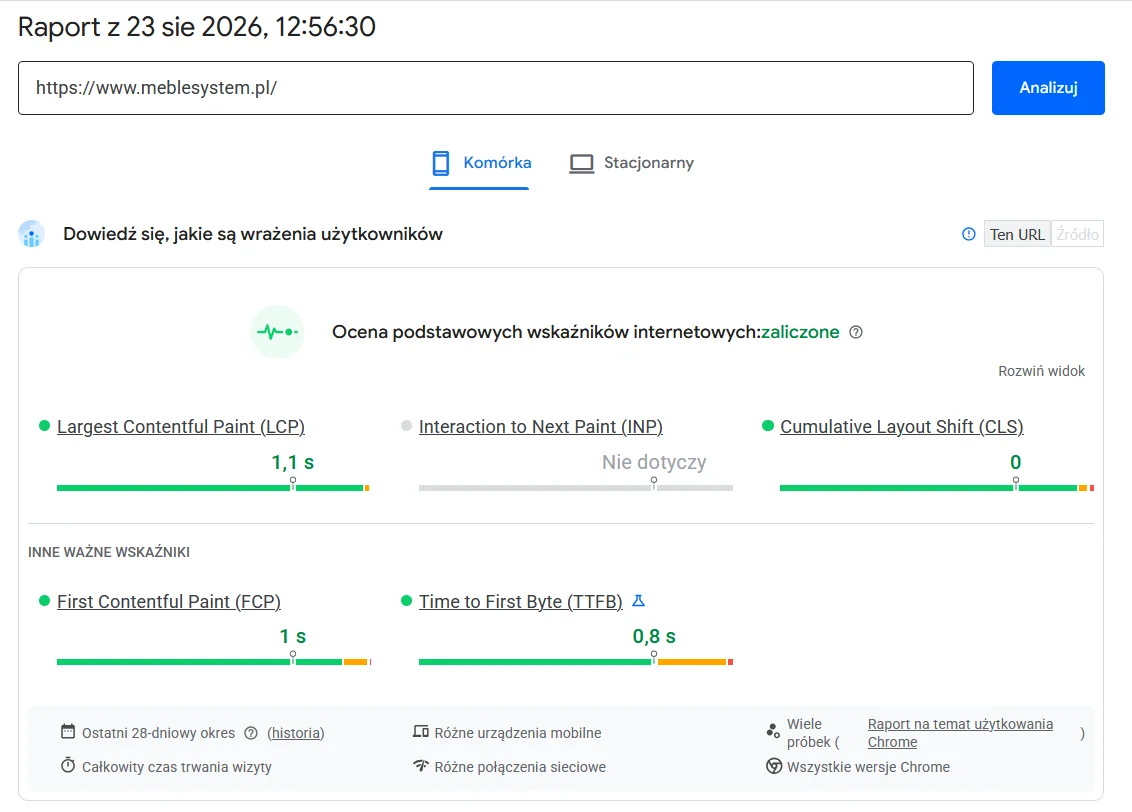
The effect shows up in Google’s measurements. Core Web Vitals, computed from real user visits over the last 28 days, pass the assessment — the page’s main element renders in 1.1 seconds:
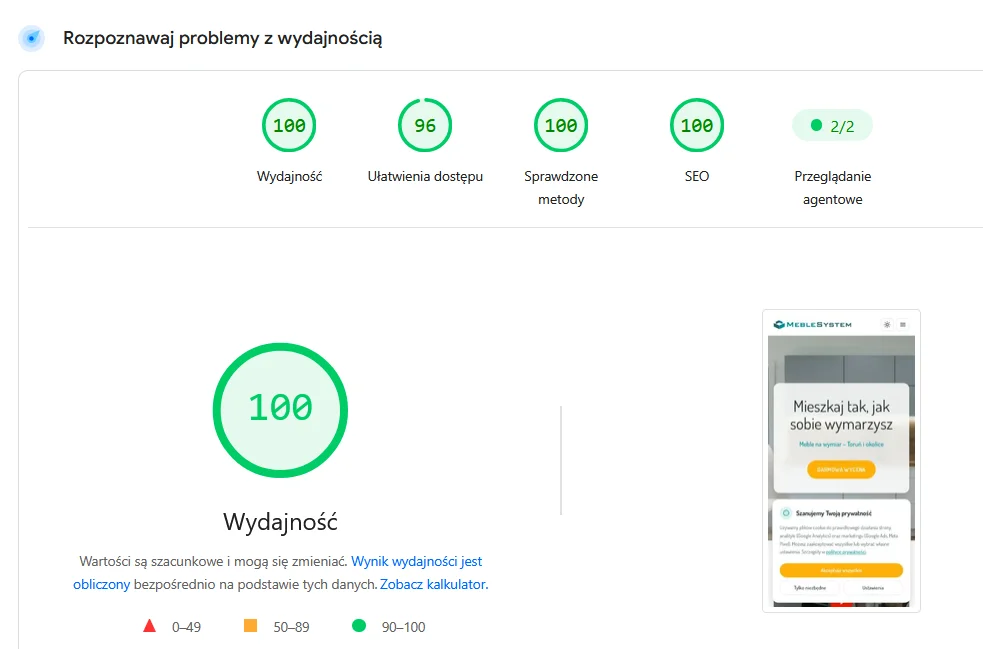
The PageSpeed lab test adds a full set of scores on top: 100 points for performance, 100 for SEO and 100 for best practices:
A migration behind the company’s back
The business worked normally the whole time: answering calls, sending quotes, publishing new projects. The move ran alongside, in this order:
- An inventory of every address. A crawler walked the entire old site and recorded every existing URL. On top of that came 16 months of Google Search Console data showing which pages actually bring visits from search.
- Exporting content and the database. Posts, pages and quote-form inquiries from recent years left WordPress through scripts; the content went through automated conversion, and I fixed by hand the places the automation couldn’t handle.
- A redirect map. Addresses that changed form on the new site received 301 redirects, so old links from search results, business listings and emails lead to the right places.
- A quote form with no server. Inquiries with attachments are handled by a function that runs only on demand (AWS Lambda), sends email notifications and stores the inquiry in a database. You pay per invocation, which in practice means pennies.
- Email without interruption. The company’s email addresses stayed the same and the mailboxes kept receiving messages throughout the move. The DNS change covered the website; the mail records were switched separately, at a controlled moment.
- The switchover. The old and the new site responded in parallel for a while, so the actual repointing of the domain was invisible to visitors.
The only trace of the switchover was my message to the client that it had happened the previous evening. That is how I understand the goal of every migration I do.
What the bill consists of after the change
BEFORE · SHARED HOSTING
2,000 PLN / yr
WordPress on a server shared with other sites, the account filled to 221 of 300 GB
AFTER · AWS CLOUD
~36 PLN / yr
The same website served from the cloud: about $0.70 a month, transfer and SSL certificate included
The details, from the client’s AWS account, August 2026:
| Item | What it does | Monthly cost |
|---|---|---|
| Route 53 | keeps the domain in DNS | ~$0.52 |
| S3 | stores the site files and photos (~2 GB) | under $0.10 |
| CloudFront | serves the site worldwide (~15 GB of transfer/mo) | $0 — fits in the permanent 1 TB free tier |
| Lambda + SES | quote form with attachments and email notifications | a few cents |
| Total | ~$0.70 |
For fairness: the old 2,000 PLN/year package also covered email and the company’s other domains, so I’m comparing the cost of the website itself. The client edits project galleries in a separate panel I built as its own module — the panel has its own, also small, bill. Even counting everything together, with the site, the panel and inquiry handling, the AWS account closes the month at the price of a single pizza.
It’s worth adding the items that simply disappeared: SSL certificate fees (free on AWS and renewed automatically), surcharges for growing transfer and disk space, the cost of keeping WordPress and its plugins updated. Also gone is a risk that’s hard to price upfront: break-ins on WordPress sites are an everyday thing, and a static site has no admin backend to break into.
Who I recommend this move to
This model fits company websites, brochure sites, portfolios and blogs — sites that change every so often and need to stay fast, secure and cheap to run for years. Scale is no obstacle: MebleSystem.pl has 110 pages and over ten thousand photos, and fits inside the AWS free tiers with a huge margin. A store with a cart and payments, or an application with user accounts, is a different construction — I build those too, just on a different set of tools.
If your hosting bill grows every year while your site changes a few times a month, send me its address. I’ll tell you whether it can be moved this way, how long the move takes and how the bill changes. A new company website starts at 3,000 PLN net with me, a brochure site at 1,500 PLN, and moving an existing site is priced after I’ve seen it — usually below one year of the current hosting.