Search Console, Analytics and Google Ads in one panel: a business owner sees all their visibility on one screen
How I built a panel that pulls data from three Google tools every night for all the domains of one furniture company and shows the path from a search impression to a quote request. With screens from the working panel.
Karol Leszczyński · Toruń, Poland
The furniture company whose website I moved to AWS runs several sites at once: the main website plus separate sites for its brands and cities — seven domains in total. The data about how those sites perform in Google lived in three separate tools: Search Console shows who sees the site in search results, Analytics shows what people do after they arrive, and the Google Ads panel shows what the advertising costs. Three logins, three different screens, each in technical English, and none of them answers the owner’s actual question: what is all this getting me?
So I built a panel that pulls data from all three sources every night through Google’s official APIs, stores it in its own database and shows it on one screen, for all the company’s domains at once. The owner logs in with one password and knows where things stand within minutes. This post shows what exactly they see and when such a panel makes sense.
What the client sees after logging in
The first screen is Google visibility from Search Console: clicks, impressions, click-through rate and average position, with a day-by-day chart and ranges from one week to sixteen months. A single switch flips the view between one domain and all of them:
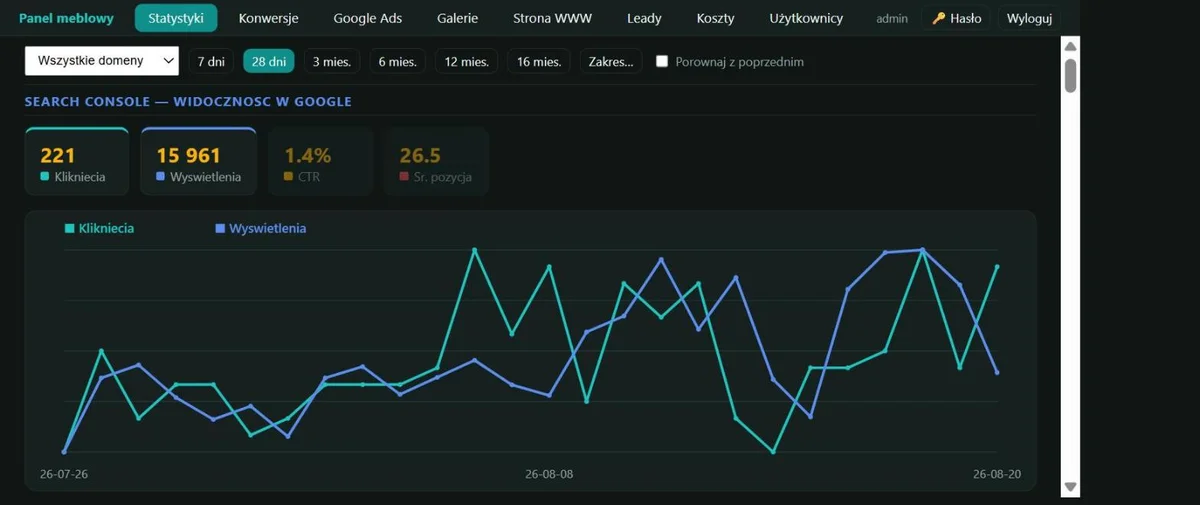
The same numbers break down per domain, so it’s immediately clear which site pulls the most weight and which one is still warming up:

Further down are sections from Analytics (sessions, users, traffic channels, conversions) and from Google Ads, with the cost of every keyword and the clicks and conversions it brought. Next to the Google data the panel also keeps things Google can’t see: quote requests from forms and email, project galleries and costs. It’s the same panel the company uses to edit its website — the data and the daily work live in one place.
From a Google impression to a quote request
The most interesting part joins data from two sources into one funnel. Search Console knows how many times the site appeared in search results and how many times someone clicked. Analytics knows how many of those visits turned into sessions and how many sessions ended with a conversion — for this company a conversion is a submitted furniture quote request. The panel lines those numbers up one under another:
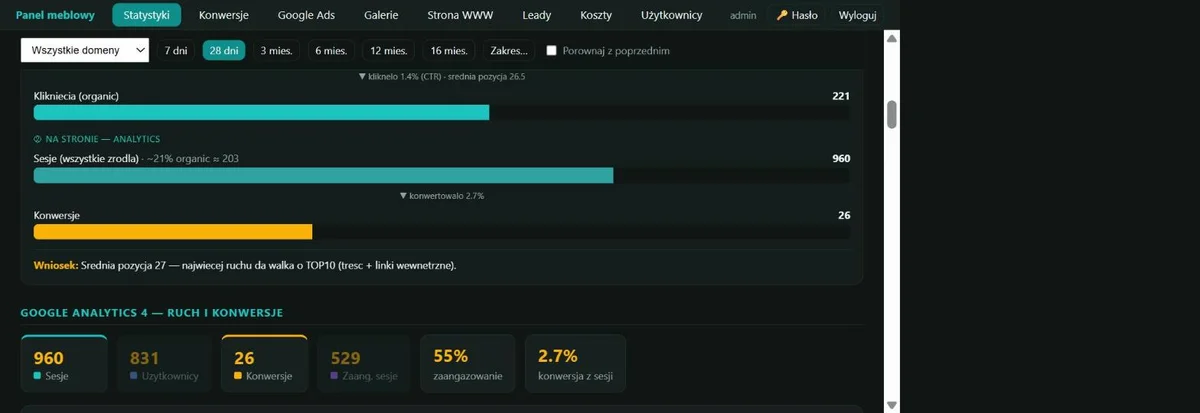
Over the last 28 days it looked like this: 15,961 impressions in search, 221 clicks out of those (a 1.4% click-through rate at an average position of 26), 960 sessions from all channels and 26 quote requests. The panel writes out the conclusion that follows from these numbers on its own: at an average position of 26, the biggest traffic gain comes from reaching the top ten results, which means working on content and internal links. When the same data lives in three tools, conclusions like this have to be assembled by hand; here they’re waiting after login.
The combination also surfaces things that slip through single panels: an ad keyword that costs around 9 PLN per click only defends itself when the sessions it brings actually end in quote requests. The panel shows the cost and the effect side by side, so the “keep it or kill it” decision happens at one screen.
Why a custom panel when Google gives you its tools
Three reasons this setup wins with my clients over the raw Google panels.
The history stays forever. Search Console shows at most 16 months back — older data simply disappears. The panel appends fresh numbers to its own database every night, so the company builds an archive where, three years from now, it can compare season against season. There is no catching up on this later; data nobody saved is gone.
All domains and all sources at once. Google shows every service and every domain separately. Here seven domains, three data sources, leads and costs meet on one screen, and the company-wide total is the default view. Add the things from outside Google’s world, like form inquiries — the part the owner cares about most.
The screen speaks the owner’s language. In their language, with conclusions instead of raw metrics, and with views arranged around the questions the business actually asks. An owner who used to request reports now checks in on their own, five minutes a week.
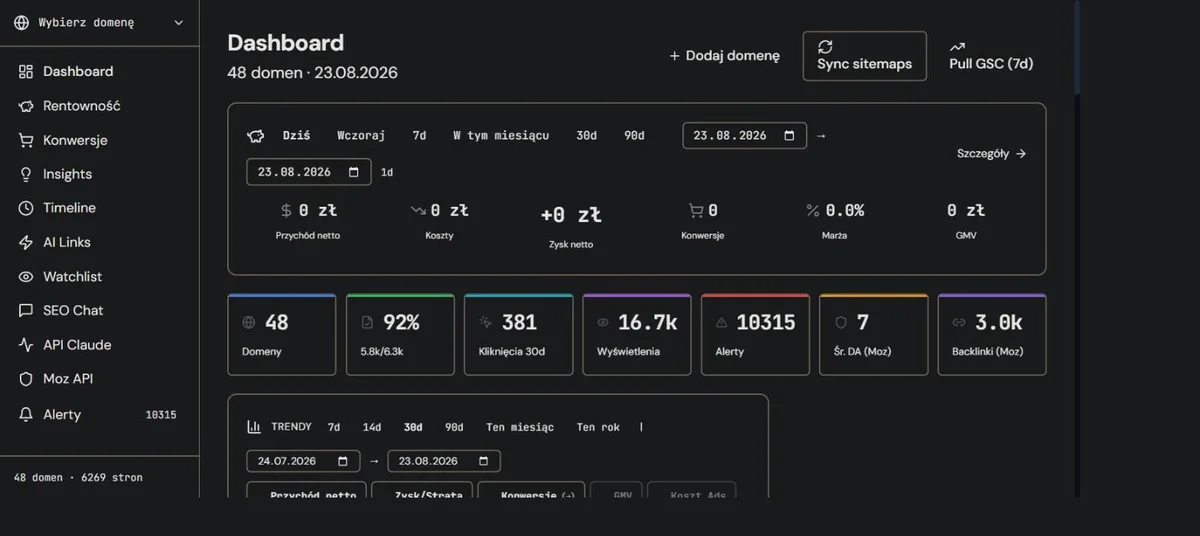
The same machinery watches my own sites. The panel where I run 48 domains and over 6,000 pages collects Search Console data nightly, computes alerts and checks link profiles — it’s where I test every solution before it reaches a client:
When a panel makes sense
I build panels like this for companies where the data carries real weight: there’s an ad budget to watch, several domains or brands to compare, a partner or board to report to, or simply an owner who wants to understand their visibility without wading through Google’s tools. A good signal is the moment when reports “on request” turn into a monthly chore — the panel does that chore every night by itself.
Technically the panel is built either as a module of a website I run, or as a separate web application with user accounts. The scope varies: from a plain Search Console view for one domain to the full set with a funnel, ad costs and leads for several sites, so I price it after a conversation about the data sources. If your data also lives in three places and nobody puts it together, write to me — I’ll show you a working panel live and tell you what one would cost for your company.